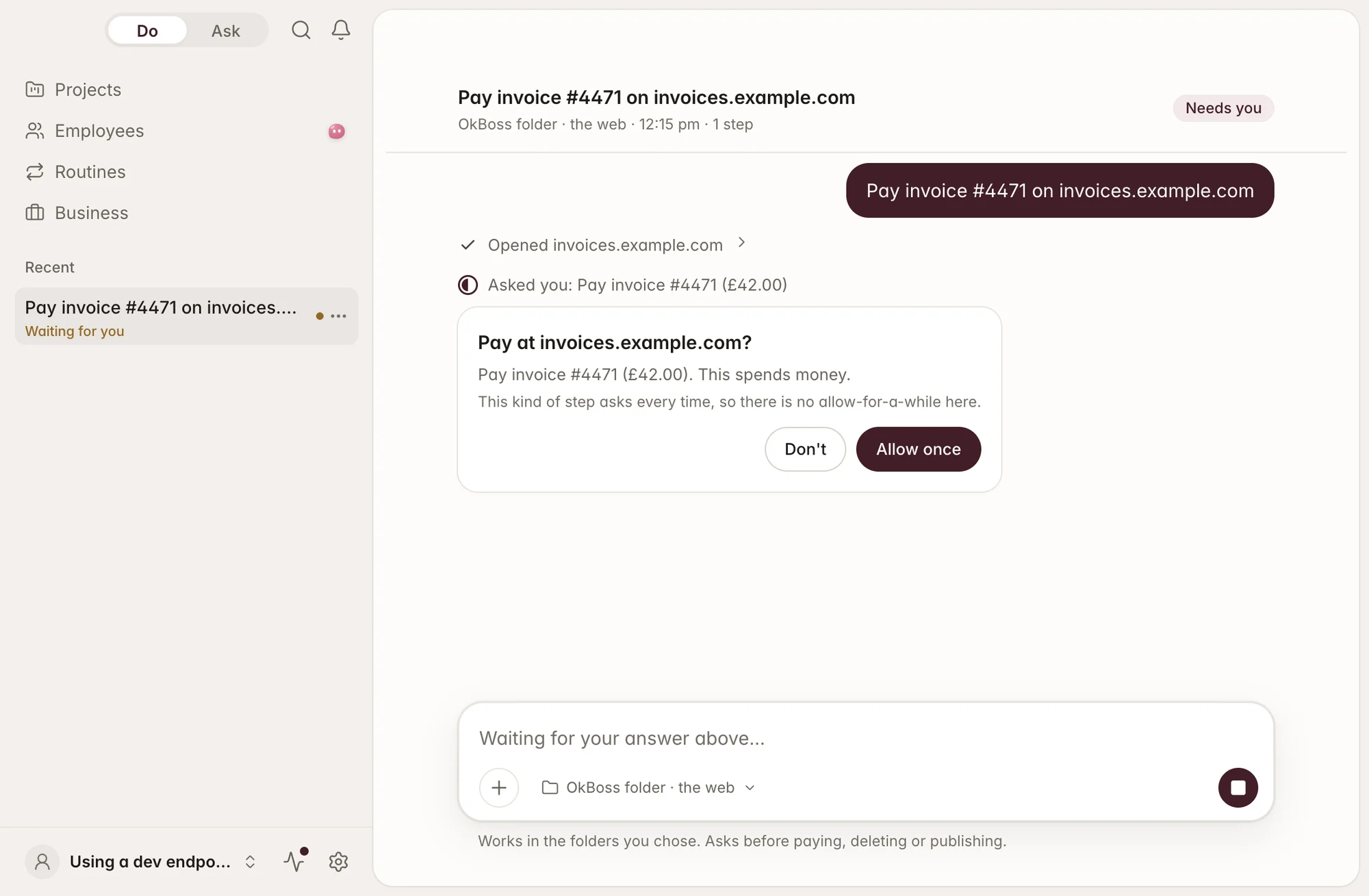
It asks before it pays.
Or deletes. Or posts.
Anything that pays, deletes or publishes waits for your OK — every time, written into its rules.
OkBoss

OkBoss is a desktop app that does your everyday computer work for you — documents, spreadsheets, research, emails and routines. Tell it once in plain words. It works on your own computer, with your logins kept there, keeps going after you close the laptop, and shows you what it made.
Anything that pays, deletes or publishes waits for your OK — every time, written into its rules.
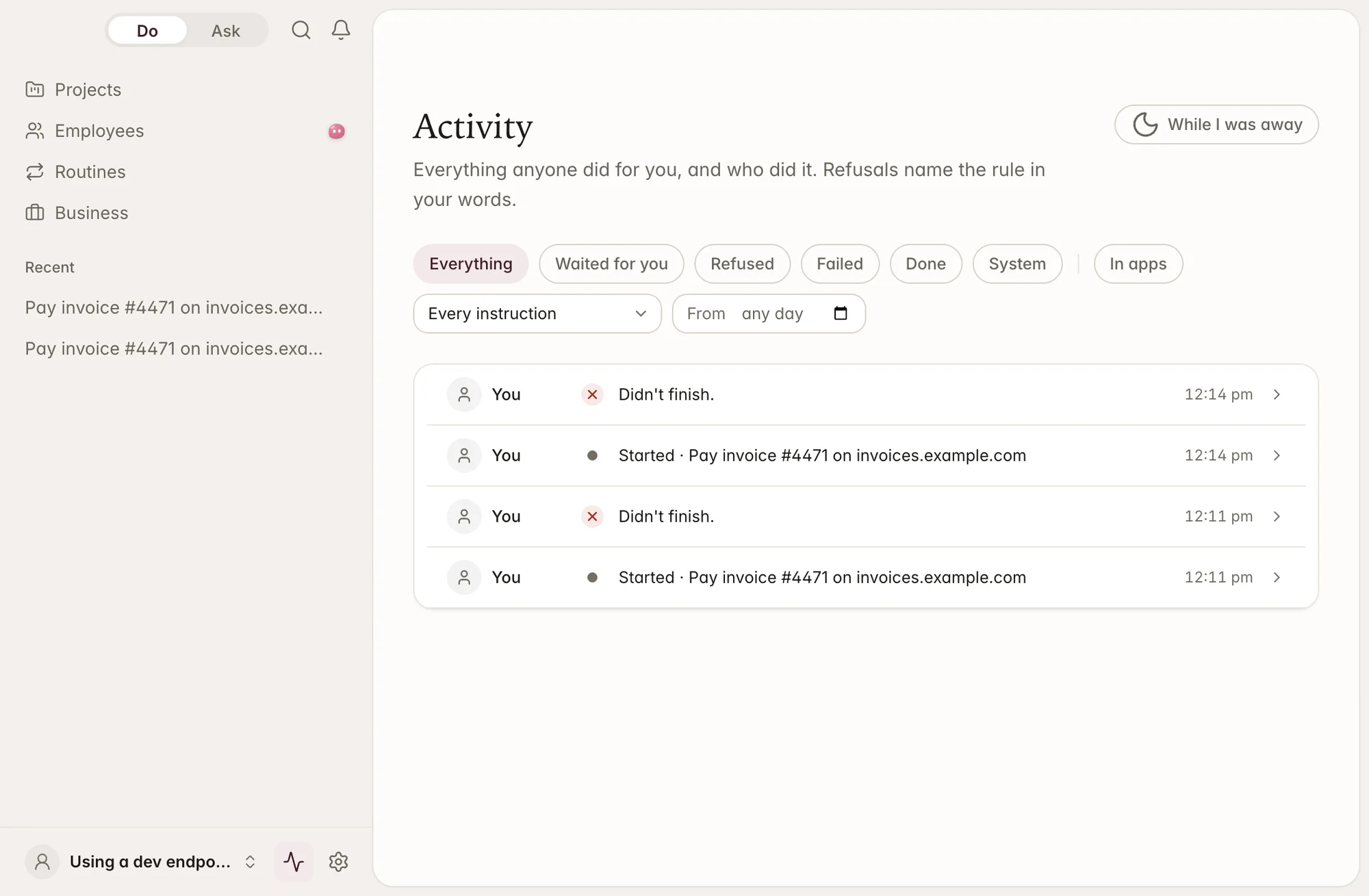
Every act goes into the activity log first. If the log can’t be written, the act doesn’t happen.
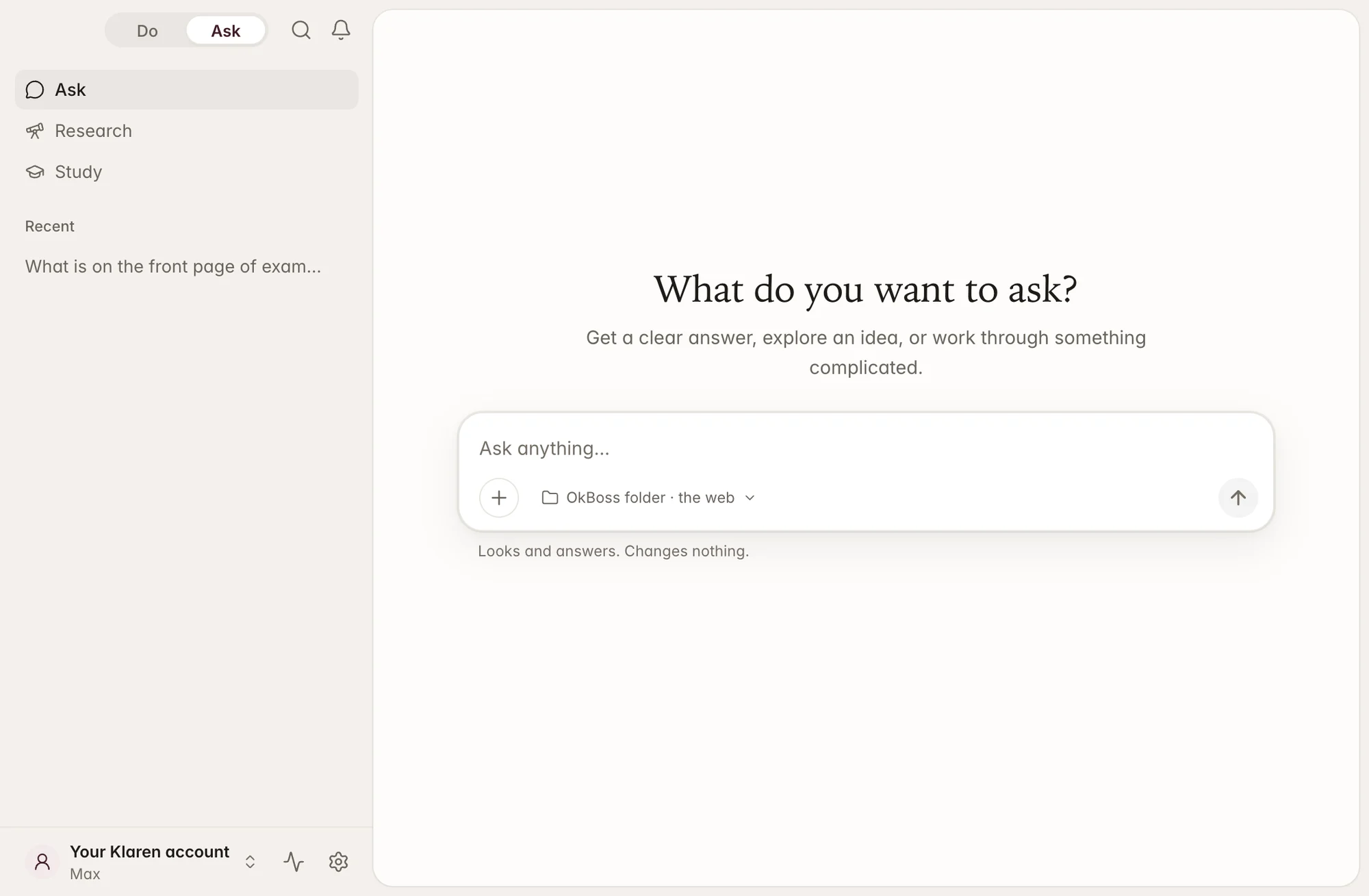
In Ask, OkBoss can’t write, send, pay or delete. To make a change, you switch to Do — on purpose.
Do works inside the folders you give it — nothing outside them.
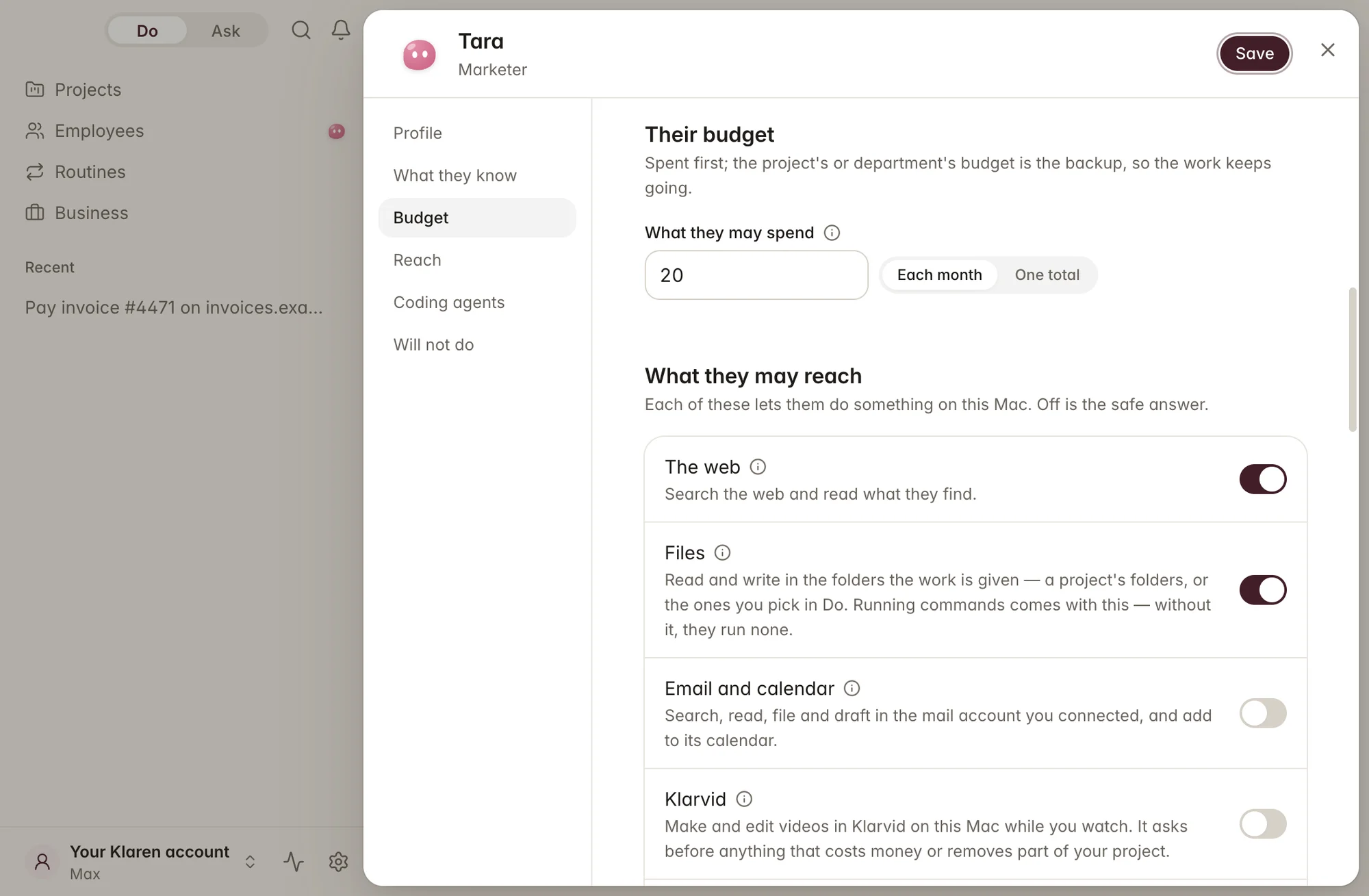
Give each employee a job, the places they may reach and a budget — and hand their work over when they move on.
A refusal names the rule in plain words and tells you the next step — never a code.
The problem
Chat apps can only talk. Tools that act on your behalf can pay, post and delete — and most don’t ask first or show you what they did.
Once in chat, once in notes, once in a task, once to a colleague.
The context lived in their head and their chat history.
Copy, paste, re-format, repeat.
The reminder fired while the laptop was closed.
Chasing sources, losing track of which said what.
Money, posts and files changed before you could say no.
OkBoss asks first and writes it down. Then it does the work.
The method
OkBoss runs every step past the same rule book before it acts — and records the decision, either way.
How you work
A small business runs on a chat app, a browser, notes, Telegram, mail and a task list. OkBoss brings the asking and the doing into one app — with your OK where it matters.
Today, running the week
Every switch, every copy-paste is yours.
With OkBoss · one app
The workspace
Real screens from OkBoss. Ask, Do, Employees, Routines and Activity — one app on your Mac.
Answers with their sources. Ask can’t write, send or pay — that’s Do’s job.
Tested, not hoped
OkBoss’s rules and log are tested on every change, and its parts have been run for real — with the results written down, including what isn’t proved yet.
Browser
A Do task drove OkBoss’s own browser to a page and finished, with every step logged.
19 Sep 2026: page loaded, task finished in 1.3 s
Rules
Twenty-five built-in rules decide what waits for you, what is refused and why.
Checked by the test gate on every change
Log
The activity log is append-only; a failed write stops the act.
Enforced in the log itself
Tests
Typecheck, lint, tests and a two-architecture build must pass before anything merges.
About 750 test files across core, shell and UI
From OkBoss’s own test records, September–October 2026. OkBoss is coming later; posting to live social accounts and budget limits will be shown once they are proved.
OkBoss reads the deck, the numbers and the thread, reasons through the options in front of you, and turns the decision into the tasks and drafts that follow. Next week it remembers why.
“Read Q3 numbers and the board thread. Which two levers move runway most, and draft the update.”
Point it at a folder of papers or filings and ask across all of them. Every claim in the answer keeps a link to where it came from, so the write-up survives a sceptical reader.
“Compare the methodology sections of these twelve papers and flag where they disagree.”
One thread carries the brief, the reasoning and the deliverables. Correct it mid-thought and it continues from there instead of starting over.
“Turn this discovery call transcript into a scoped proposal with three options and a timeline.”
Routines that run on your own machine, with your own credentials, and show you what they produced. Tell it once; it does the work again next week.
“Every Monday, pull last week's tickets, group by cause, and draft the summary for the team.”
The details
Mid-sentence, immediately.
⌘1 Do, ⌘2 Ask, ⌘N new, ⌘K search, ⌘, Settings.
Business forms start from what’s on screen — nothing saved until you change it.
A password you type is cleared before it’s sent anywhere.
Taking someone off a project asks first and writes a hand-over note.
One banner tells you what was missed.
Up to 15 minutes, so a routine isn’t missed.
Asks OkBoss if it’s awake — and since when.
Ask’s refusals tell you the next step.
Your business
Keys live in your Mac’s Keychain — OkBoss sees labels, never the values. Bring your own AI key if you like. Telegram works only with chats you paired, and it never asks for a secret there: “Come to your Mac.” Places are signed into in OkBoss’s own browser, so it never sees your password.
Plans
OkBoss is coming later. These are the planned prices, published now so you can plan, and they may change before launch. Purchasing opens on the same Klaren AI account.
One person with one agent working for them.
Rp668.000
Paid once, for 40 days
Rupiah only: QRIS, GoPay or virtual account
Coming later
Splitting one job across three agents at once.
Rp1.718.000
Paid once, for 40 days
Rupiah only: QRIS, GoPay or virtual account
Coming later
Eight agents, for work that runs overnight.
Rp5.038.000
Paid once, for 40 days
Rupiah only: QRIS, GoPay or virtual account
Coming later
Prices are published ahead of launch so you can plan. Purchasing opens when OkBoss ships; what each plan includes will be listed here before then.
No. A chat ends when the answer arrives. OkBoss is built around what happens after: the plan, the tasks, the routine that runs again next week, and the record of why the decision was made.
Agents. Pro is one agent that keeps going when you close the laptop. Max is three, none of which stop when you do. Ultra is eight, working overnight. The subscription sells agents.
On your machine. OkBoss signs into your tools from the computer in front of you, with credentials it stores locally. Nothing is held in a cloud session on our side.
OkBoss is a desktop application, and it can run a local model entirely offline. Klaren AI's hosted models need a connection.