Say what you want changed.
It edits the real project.
The Director works through the same typed operations you use by hand — tracks, clips, titles, looks — never by simulating clicks.
Klarvid
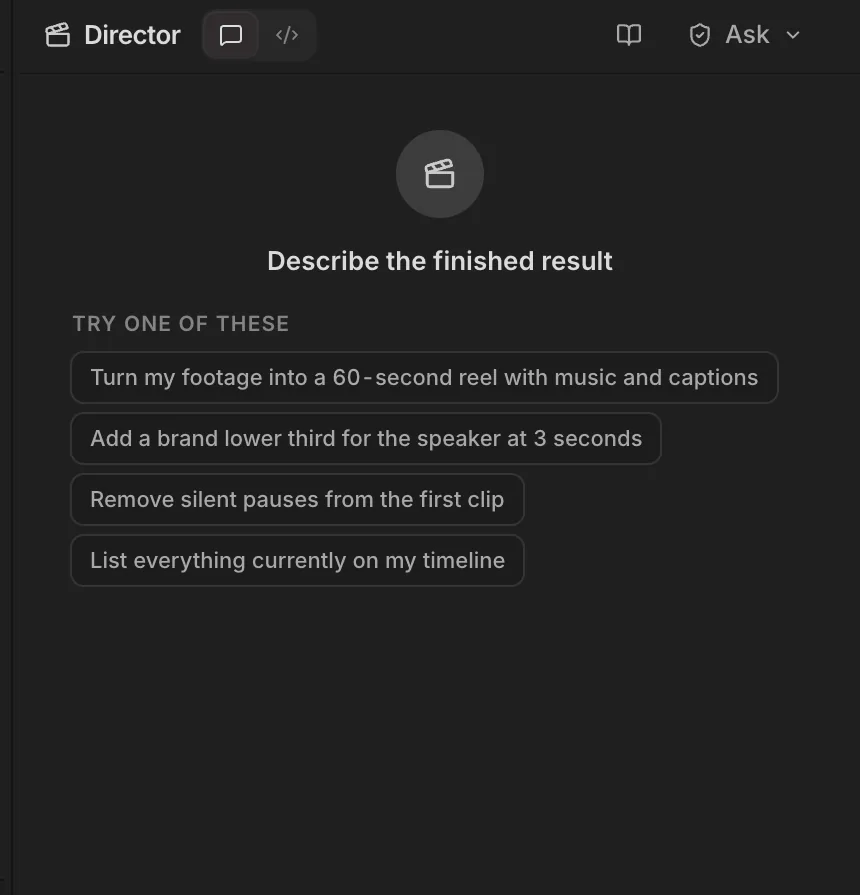
Klarvid is a desktop video editor with a full multitrack timeline, motion graphics and AI footage generation in one window. On top sits the Director: type the change you want the way you would say it to an editor, and it edits your real project — asking before every change, and undoing a whole request in one step.
The Director works through the same typed operations you use by hand — tracks, clips, titles, looks — never by simulating clicks.
Review each edit is the default. Approve, step through, or discard — or let it plan first and show you the steps.
Each request lands as one step in the Edit Log. If any part fails, Klarvid rolls the whole request back — no half-made edits.
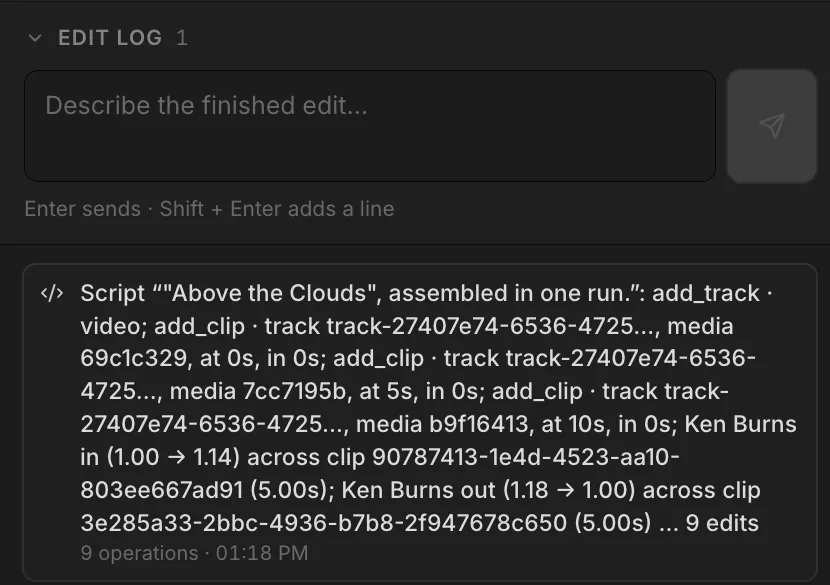
Video, graphics and text tracks, an inspector with real handles, and 30 built-in looks — a full editor, not a template filler.
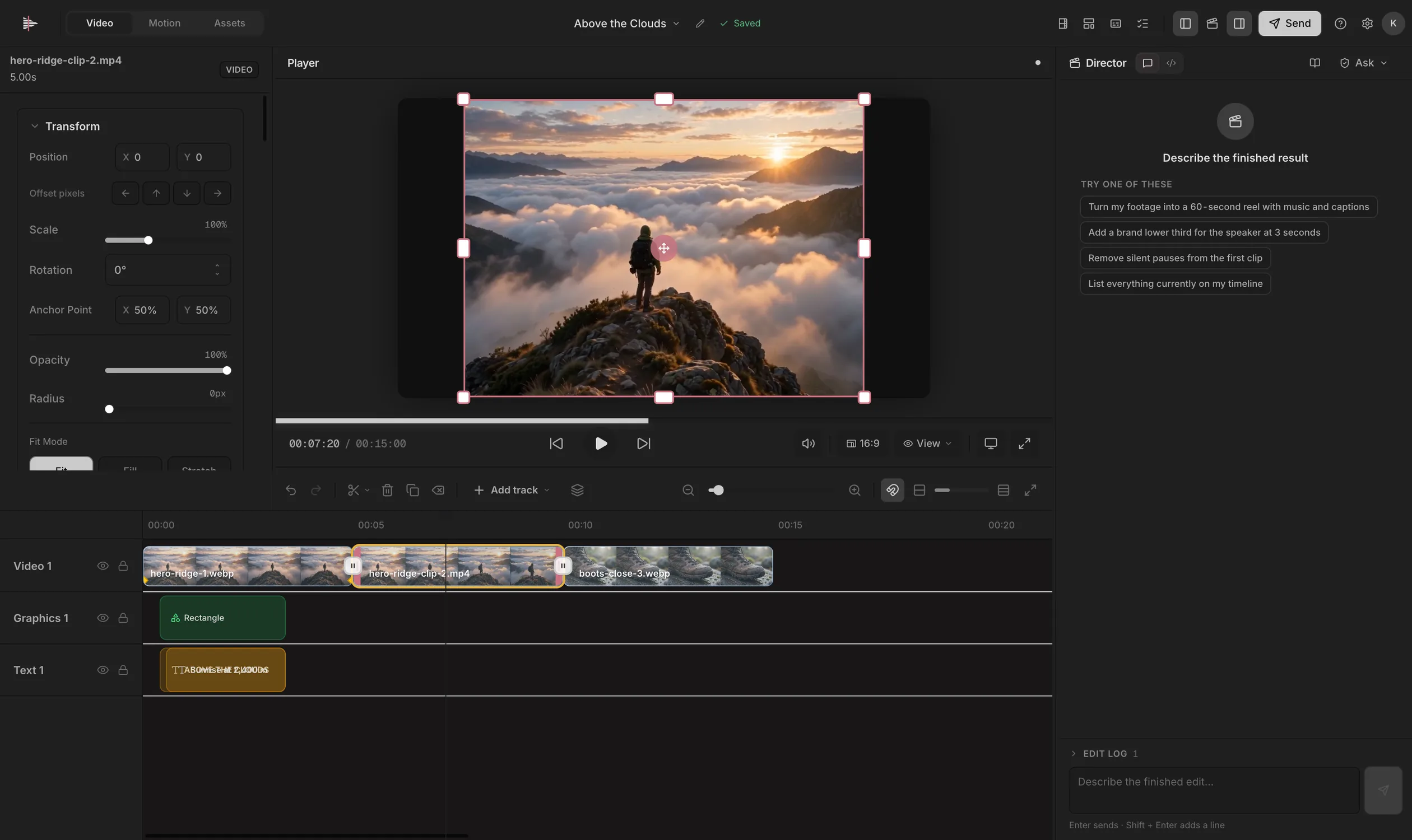
Titles, lower thirds, logo reveals and captions are built in Klarvid’s own compositor, on their own layers and keyframes.
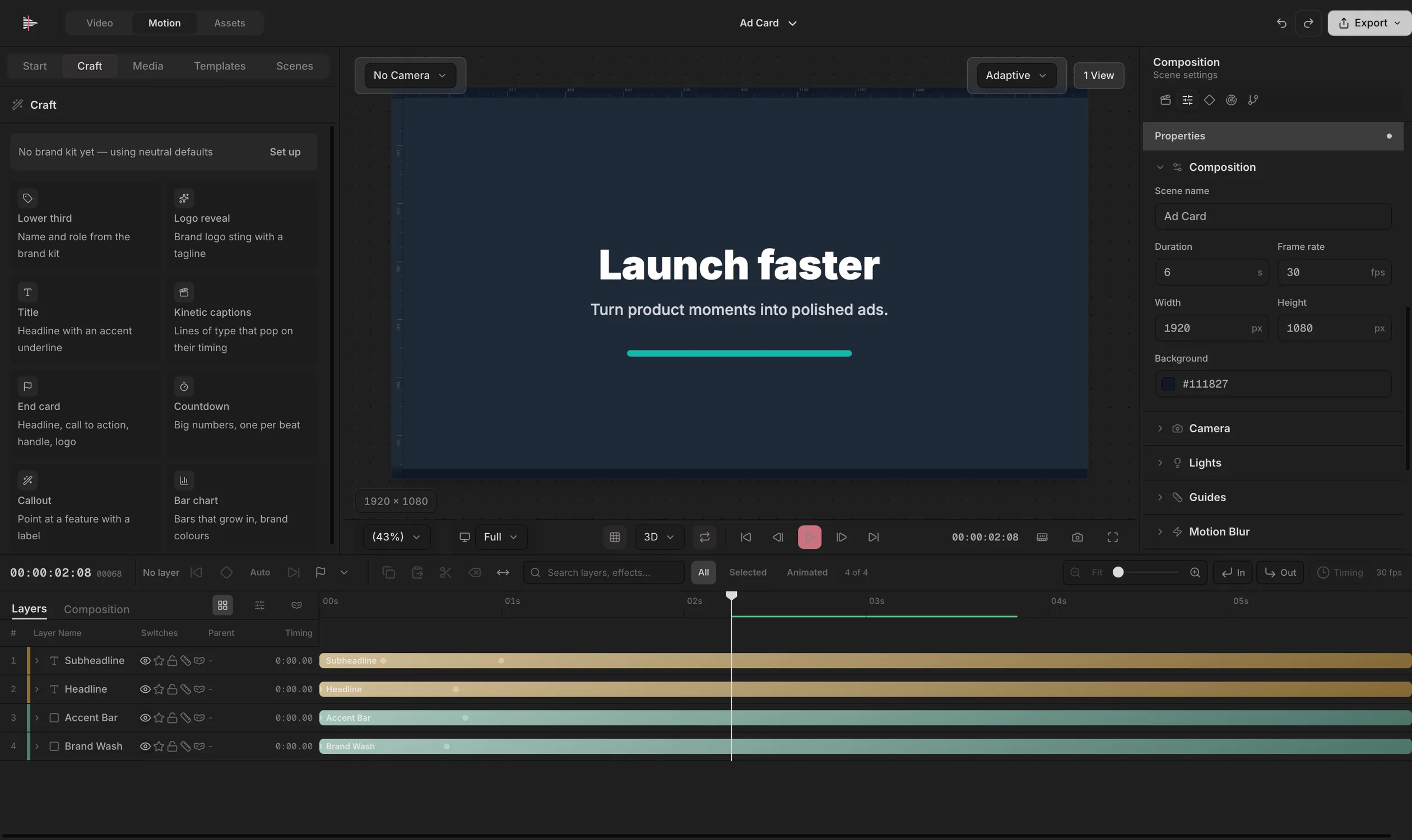
Script a whole cut. It runs sandboxed, up to 500 operations, and lands as one undo and one log entry.
The problem
Cut in one app, titles in another, captions in a third, loudness in a fourth, AI footage on a website. And the AI tools that promise to help can’t touch your timeline.
Cut, title, caption, mix and generate — each in its own program, with exports in between.
You can’t see what it changed, and you can’t take it back in one step.
One new line of text, and the titles, timing and export start over.
You find out what a clip cost after you’ve made it.
Too quiet on one platform, clipped on another.
Scrubbing through raw clips to find the shot you need.
Klarvid is one window. An editor, a compositor and a Director that asks first.
The method
The Director never touches your project directly. Every change goes through the same checked operations as your own hands — and you see each one.
How you work
Today a short video passes through a timeline app, a motion app, a caption tool, an audio tool and an AI site. In Klarvid it stays in one project.
Today, making one video
Every export, import and re-edit is yours.
With Klarvid · one window
The workspace
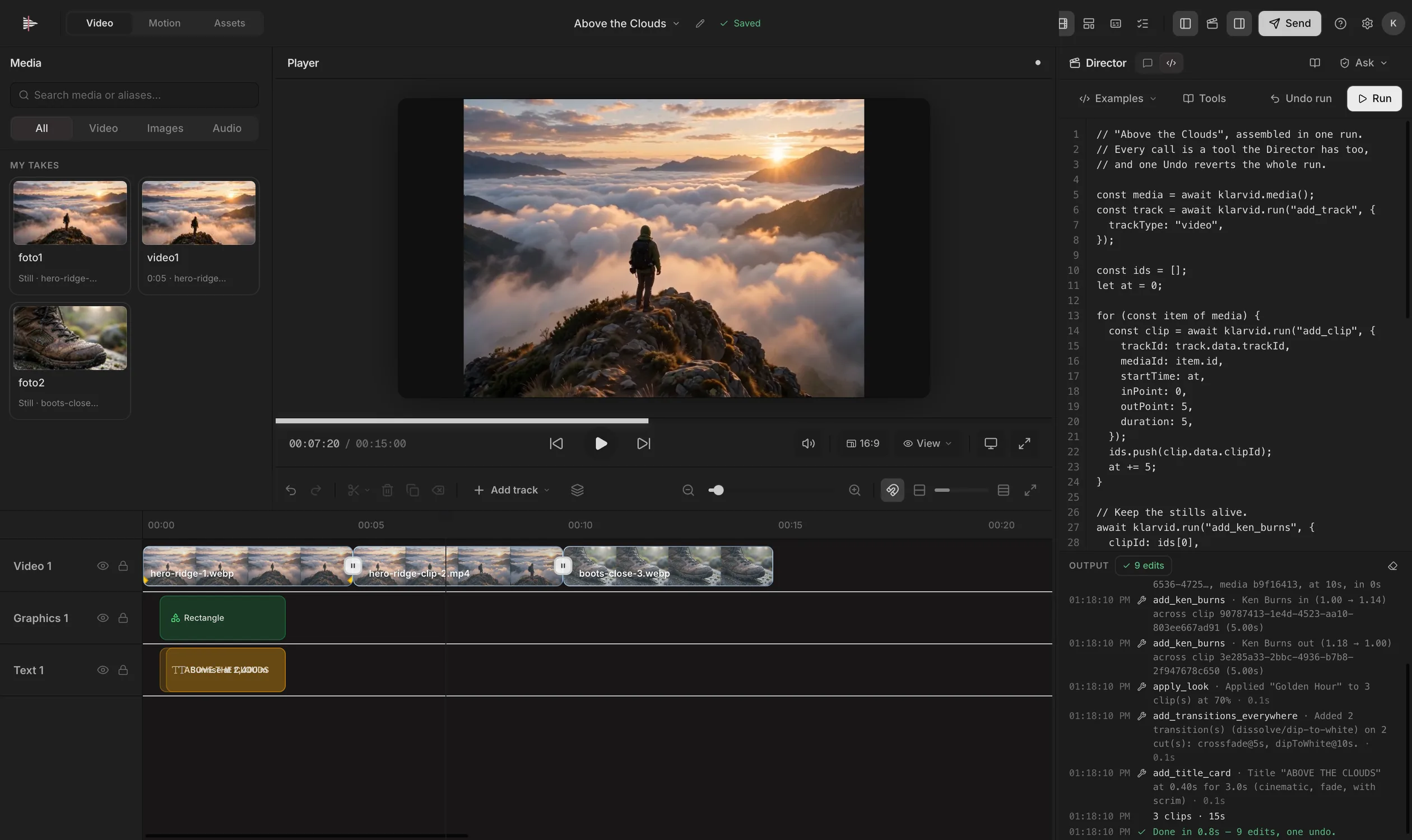
Real screens from Klarvid. The Director, the timeline, Motion, Assets and Send — all in one window.
Type what you want — a 60-second reel with captions, a lower third at three seconds, silent pauses removed. The Director plans it on your real project.
Measured, not guessed
Klarvid measures what it makes: loudness to the broadcast standard, the exported file’s structure, and a review before it calls a cut done.
Audio
Measures integrated loudness and normalises to a target — −14 LUFS for social, with a −1 dBTP ceiling by default.
Runs on your Mac, in Klarvid’s own audio engine
Undo
If one step of a multi-step request fails, every step before it is undone.
Two clips to three, one undo back to two — then reloaded intact
Export
Dimensions, duration and codecs are read from the exported file’s own structure.
Three MP4s: 1920×1080, about 30 fps
Director
An eleven-task evaluation of the Director on Klarvid’s own tools.
8 Oct 2026: 11 of 11 passed, 0 schema errors
Results from Klarvid’s own test notes, July–October 2026. Klarvid is coming soon; these come from builds in testing.
The details
The Director asks before every change until you choose otherwise.
Partial work is rolled back, not left half-done on your timeline.
A script run tells you exactly what it did, and caps itself at 500 calls.
One button ends the run.
Keyboard first, with source and program keys in the viewer.
Home and End jump to the ends.
Generation shows its cost in credits before it runs.
Footage names in Klarvid are aliases; your files on disk stay as they are.
Your footage
Projects, footage and edits live on your Mac. Loudness, silence and person mattes are worked out locally. When an AI feature needs a model, it says so — and paid generation asks first, with a spend allowance you set.
Pricing
Every plan is the whole product; what changes is how much of the Director runs at once. Take one as a plan, which renews monthly or annually until you cancel — or as a Founding 888 seat: bought once at the price shown, it runs 40 days instead of 30 (13 months on annual), carries a seat number that is never reused, and then it ends.
Editing by hand, with the full timeline and Motion.
Rp178.000
Paid once, for 40 days
Rupiah only: QRIS, GoPay or virtual account
Coming soon
Handing the cut to the Director and approving what it changes.
Rp528.000
Paid once, for 40 days
Rupiah only: QRIS, GoPay or virtual account
Coming soon
Carrying several cuts at once, each with its own Director.
Rp1.758.000
Paid once, for 40 days
Rupiah only: QRIS, GoPay or virtual account
Coming soon
A studio shipping against a date.
Rp5.258.000
Paid once, for 40 days
Rupiah only: QRIS, GoPay or virtual account
Coming soon
Prices are published ahead of launch so you can plan. Purchasing opens when Klarvid ships; what each plan includes will be listed here before then.
Valid for 40 days, then it ends. It is a fixed term, not a permanent licence. Nothing renews it for you, so there is nothing to cancel — and nothing to forget about either.
40 days instead of 30, for the price of a month. The first 10 days run on your own model key. The same holds on an annual term: 13 months instead of 12.
Seats are assigned in payment order and never reused, and Klarvid's run is its own — a Klarcode seat does not spend it.
No price lock, no perk you only hear about afterwards, no “gone forever”. The low numbers are the only real scarcity, so they are the only one we claim.
No. Klarvid is not on sale yet, and the Director is not switched on. We have not set a date for either, and we are not going to invent one. The plans are published so you can plan; purchasing opens when Klarvid ships.
No. The timeline is OpenReel's full multitrack editor and Klarvid hides none of it. The Director reaches the project through the same registered operations you can drive by hand or from Code mode, every write it makes is attributed in the Edit Log, and any of it can be undone.
Yes. Drag in video, images and audio, and each file gets a short alias — foto1, video1, voice1 — with the original filename kept visible. Renaming an alias never touches the file on your disk. Generate footage instead, or mix both in one cut.
You do, and you see the price before you press the button. Generation is paid from Klar Credits, a prepaid top-up shared across every Klaren AI product at about Rp 200 (or one US cent) a credit, or billed straight to your own provider key if you add one. Plans do not include a credit grant.
A fixed term, bought in one payment. It is not a licence and not a subscription: it runs for 40 days and then it ends, with nothing renewing it and nothing to cancel. You pay a normal monthly or annual price once and get more time than it buys: 40 days instead of 30, or 13 months instead of 12. Klarvid has its own run of 888 numbered seats, assigned in payment order and never reused. There is no price lock and no perk you only hear about afterwards; the low numbers are the only scarcity, so they are the only one we claim.
A standard video file, encoded from the real project at its own resolution and frame rate. Klarvid shows you the format, the size, the aspect ratio, the frame rate and the duration before it starts, and asks where to save it.
On your machine, as a desktop application. macOS on Apple silicon will be the first build; macOS on Intel, Windows, iOS and Android are on the plan and listed as coming on the download page rather than claimed here. Your projects and footage live on your disk. What does leave is what a model has to see: footage understanding describes and transcribes imports through a provider, and Settings turns that off. A Klaren AI account carries the plan and the shared credit balance.